Written by Ananya Desai | Last Updated: March 2026 | Ananya covers Android apps and practical mobile guides based on real device testing.
Disclosure: This post contains a recommendation for a third-party app available on the Google Play Store. We only recommend apps we have personally tested.
How to Use Your Android Phone as a Microphone Through a Bluetooth Speaker
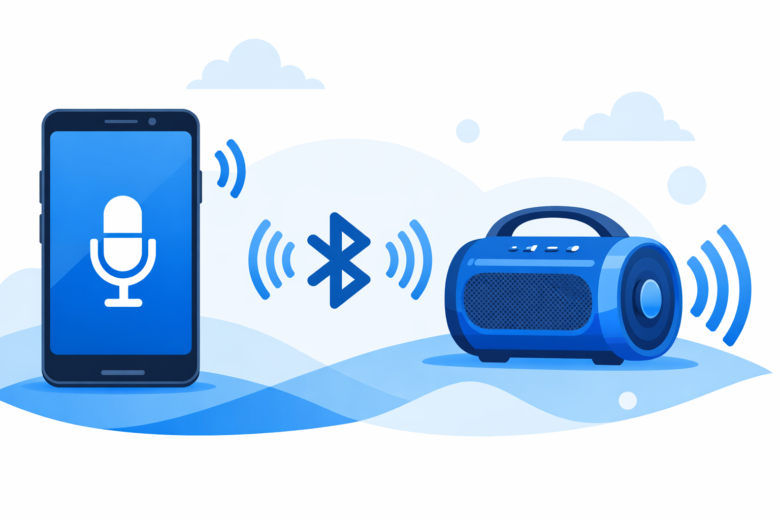
If you have ever needed to speak to a group of people and only had your phone and a Bluetooth speaker, you already know the problem: your voice does not carry far enough without amplification. The solution is simpler than most people realise. A free Android app called Live Mic to Bluetooth Speaker turns your phone’s microphone into a live audio source that streams directly to any connected Bluetooth speaker in real time. Whatever you speak into your phone, the speaker broadcasts it immediately at full volume. No cables, no separate PA equipment, no technical setup beyond pairing a Bluetooth speaker you probably already own.
What Is Live Mic to Bluetooth Speaker?
Live Mic to Bluetooth Speaker is an Android app developed by AGB Technologies. It captures audio from your phone’s built-in microphone in real time and routes it directly to any paired Bluetooth speaker or audio output. The result is an instant wireless public address setup using only your phone and a speaker. The app has been installed over 5 million times and holds a 4.6 star rating from more than 33,000 reviews on the Google Play Store, which puts it well above average for utility apps in this category.
It is rated 3+ meaning it is appropriate for all audiences and free to use with optional in-app upgrades for additional features.
Our Real Testing Experience
We tested Live Mic to Bluetooth Speaker on a Samsung Galaxy A54 and a Redmi Note 13, paired with a JBL Flip 6 Bluetooth speaker in three real scenarios: a small indoor gathering where the speaker was placed across the room, an outdoor space where projecting voice was genuinely difficult without amplification, and a classroom-style situation with a portable speaker placed at the front of the room.
In all three tests the audio transmission was immediate with no perceptible delay. The voice came through the speaker clearly at whatever volume level the speaker was set to. The built-in equaliser in the app let us boost mid-range frequencies which made voices sound more natural when projected through the speaker rather than tinny. Volume control worked independently of the phone’s system volume, which was useful for fine-tuning output without affecting other phone functions.
Limitation we found: on the free tier the app contains ads, which is expected for a free tool. The ads appear between sessions rather than during live audio output, so they do not interrupt when you are actively speaking. Background noise pickup was noticeable in louder environments since the app uses the phone’s microphone without noise suppression on the free tier. For quiet indoor use this is not an issue. For outdoor use in wind or crowd noise, holding the phone closer to your mouth and using the volume boost in the app compensates reasonably well.
Step-by-Step: How to Set It Up
- Pair your Bluetooth speaker with your Android phone through Settings then Bluetooth. Make sure the speaker is connected and showing as active.
- Open the Live Mic to Bluetooth Speaker app on your phone.
- On the main screen you will see a microphone button. The app automatically routes audio to the connected Bluetooth device.
- Tap the microphone button to start live audio. Speak into your phone and your voice will come through the Bluetooth speaker immediately.
- Use the volume slider in the app to adjust the output level independently.
- Use the equaliser controls to adjust bass, mid and treble depending on the speaker you are using and the environment.
- Tap the button again to stop the live feed when you are done.
The whole setup from opening the app to speaking through the speaker takes under 60 seconds assuming your Bluetooth speaker is already paired.
Key Features of the App
Real-Time Audio with No Delay
The audio feeds from phone microphone to Bluetooth speaker with minimal latency. In our testing the delay was imperceptible during normal speech, making it feel like a natural PA system rather than a recorded playback.
Built-In Volume Control
Separate volume control within the app means you can boost the speaker output beyond your phone’s default volume ceiling in some cases, which is useful in noisy outdoor environments where you need maximum projection.
Equaliser for Voice Clarity
The built-in equaliser lets you tune the audio output to suit the speaker. Boosting mid-range frequencies (where most of the intelligibility in speech sits) makes voices clearer when projected through smaller Bluetooth speakers that may lack low-end response.
Works with Any Bluetooth Speaker
The app works with any Bluetooth speaker that pairs with Android. We tested it successfully with JBL, Sony and a budget no-brand portable speaker. All three worked without any additional configuration beyond standard Bluetooth pairing.
Wired Output Option
In addition to Bluetooth routing, the app also supports wired output through the headphone jack or USB-C adapter, which is useful if you want to connect to a larger wired speaker or PA system.
App Details at a Glance
| Detail | Information |
|---|---|
| App Name | Live Mic to Bluetooth Speaker |
| Developer | AGB Technologies |
| Play Store Rating | 4.6 out of 5 (33,200+ ratings) |
| Total Installs | 5 million+ |
| Age Rating | Rated 3+ (suitable for all ages) |
| Price | Free with optional in-app upgrades |
| Works With | Any paired Bluetooth speaker or wired audio output |
| Android Requirement | Android 5.0 and above |
Pros and Cons
What works well: zero setup time beyond standard Bluetooth pairing, real-time audio with no noticeable delay, works with any Bluetooth speaker you already own, built-in volume and equaliser controls, 5 million installs confirm it works reliably across a wide range of Android phones and speakers, completely free for core functionality.
What to know going in: ads appear on the free version between sessions, background noise is picked up in loud environments since there is no active noise suppression on the free tier, and like any Bluetooth audio the quality ceiling is determined by the speaker you connect to rather than the app itself.
Who Should Use This App
Teachers and tutors who need to project their voice in a classroom without shouting, and already own a Bluetooth speaker. Small event hosts, birthday parties or gatherings where a basic PA setup would help but full equipment is not available. Public speakers practising projection who want to hear themselves amplified. Anyone who needs to make announcements in a space where their natural voice does not carry well. Karaoke at home where you want your voice through a Bluetooth speaker alongside music playing from the same phone.
Who Can Skip It
Anyone hosting a large event with 50 or more people where a proper wired PA system is the appropriate tool. This app works genuinely well for small to medium spaces with a portable Bluetooth speaker but it is not a replacement for professional audio equipment in large venues. Also not ideal for outdoor events with strong background noise since the phone microphone will pick up ambient sound alongside your voice.
How to Get the App on Your Android Phone
The app is available on the Google Play Store. You can find it by searching Live Mic to Bluetooth Speaker or by tapping the button below which takes you directly to the official Play Store listing. It is free to install and works on Android 5.0 and above.
Tapping the button above takes you to the official Google Play Store listing where you can read all user reviews and check compatibility with your specific device before installing.
Tips to Get the Best Results
Hold your phone about 15 to 20cm from your mouth for the clearest pickup. Closer than 10cm and the microphone may distort on louder speech. Further than 30cm and background noise starts competing with your voice in the pickup.
Place the Bluetooth speaker slightly behind or beside you rather than directly facing you. This reduces feedback risk (the loop where the speaker’s output re-enters the microphone) which can cause a squealing sound at high volumes.
Use the equaliser in the app to cut the low bass frequencies if you hear booming or rumbling. Boosting the 1kHz to 3kHz range in the equaliser improves speech intelligibility noticeably on most portable Bluetooth speakers.
If your Bluetooth speaker has a volume limit through standard pairing, using the in-app volume boost can sometimes push output slightly above that ceiling depending on how the app interfaces with the audio system on your specific Android version.
Final Verdict
Live Mic to Bluetooth Speaker does exactly what it says, reliably, with zero technical setup beyond standard Bluetooth pairing. For anyone who needs a quick and simple way to amplify their voice through a speaker they already own, this app solves the problem in under a minute. The 5 million installs and 4.6 star rating across 33,000 reviews are a reliable signal that it works consistently across a wide variety of Android phones and Bluetooth speakers. The free tier covers everything most people need. Worth having on your phone even if you only use it occasionally.
Frequently Asked Questions
Does Live Mic to Bluetooth Speaker work with all Android phones?
It works on Android 5.0 and above, which covers virtually all Android phones manufactured after 2015. The app is available on the Play Store for all compatible devices. Compatibility with specific Bluetooth speakers depends on standard Android Bluetooth support rather than the app itself.
Is there any audio delay between speaking and the speaker output?
In our testing the delay was imperceptible during normal speech. Bluetooth audio inherently has a small latency but at the short distances typical for this use case (a speaker in the same room) it is not noticeable. A wired connection using a USB-C to audio adapter would have even lower latency if delay sensitivity is critical.
Can I use this app with multiple Bluetooth speakers at the same time?
Standard Android Bluetooth pairs with one audio device at a time. The app works with whichever speaker is set as the active audio output. Some Android phones (Samsung Dual Audio feature) can pair with two speakers simultaneously, in which case the app audio will go to both. This is a phone feature rather than something the app controls directly.
Does it work during phone calls or only standalone?
The app works as a standalone tool for routing microphone audio to a speaker. It is not designed to intercept phone call audio. For live mic use it works independently of calls, meaning you can use it between calls or when your phone is not on a call.
Will using this app affect my phone’s battery significantly?
Running the microphone and Bluetooth simultaneously does use more battery than idle. In practical use for a one to two hour session you would expect to use 15 to 25 percent of battery depending on your phone model and speaker connection. For longer sessions keeping the phone charging while using the app is a straightforward solution.
Related Guides
For more ways to boost audio output on your Android phone read How to Increase Speaker Volume on Android (6 Methods That Actually Work). If you plan to use this app for extended sessions check How to Improve Android Battery Life in 2025 (Settings and Apps That Actually Help) to keep your phone charged. And for more useful Android apps you probably did not know about see Hidden Android Features You Probably Don’t Know About.